
Maple Work · now available
The AI agent you don’t have to second-guess.
Maple Work is a private AI agent for your Mac. Give it a folder and it finishes the task.
What’s on your desk?
Work on anything…
Taxes 2026Encrypted and private at every step
You’re still missing the 1099-INT from your savings account and your HSA form. Deductible receipts total $4,812 across 37 items. I saved accountant-checklist.md in Taxes 2026.
- Read the Taxes 2026 folder
- Total receipts by category
- Compare with last year’s checklist
- Write a checklist for my accountant
Work on anything…
My HealthEncrypted and private at every step
I put your three checkups in one table, with the values that changed the most at the top. I saved eight questions for your next appointment in questions.md.
- Read checkups.md
- Line up the values by date
- Note what changed between visits
- Draft questions for my doctor
Work on anything…
My MoneyEncrypted and private at every step
Your essentials average $3,140 a month, so three months is $9,420. At $400 a month you’d get there in about two years. The plan is in emergency-fund-plan.md.
- Read three months of bank exports
- Sort the transactions by category
- Average my monthly essentials
- Write emergency-fund-plan.md
Work on anything…
Harbor & LaneEncrypted and private at every step
Eleven clauses changed between v2 and v3. Three deserve a close read: the renewal notice window, the repair cap and a new assignment clause. The summary is in lease-changes.md.
- Read both lease drafts
- Compare them clause by clause
- List what changed
- Write lease-changes.md
Work on anything…
Security reviewEncrypted and private at every step
Two reachable paths. The refund note goes into a raw SQL string in queries.ts; it’s now parameterized. The export filename reaches a shell call; I switched it to an argument list. 214 tests pass. Details are in SECURITY-REVIEW.md.
- Map the API entry points
- Trace input to queries and shell calls
- Confirm which paths are reachable
- Patch and run the tests
Work on anything…
JournalEncrypted and private at every step
Here’s your week in your own words. Sleep and the move came up most, and Thursday was the turning point. I saved it as week-recap.md.
- Read this week’s five entries
- Pull out what happened
- Note what kept coming up
- Write the recap
Work on anything…
HomeEncrypted and private at every step
I listed the damage room by room from your 14 photos and notes, and drafted the letter. Two items still need a receipt or an estimate from you. The draft is in claim-letter.md.
- Look at 14 photos in claim-photos
- Read my notes
- List the damage room by room
- Draft claim-letter.md
Maple Work is a private AI agent for Mac, Windows and Linux from Maple AI. Point it at a project folder and it reads files, runs commands and finishes the task. It runs open models like DeepSeek, Kimi, GLM and Gemma inside secure enclaves, so Maple cannot see your chats, and you can check that yourself. It needs a Pro, Max or Team plan.
What it does
Describe the job. It reads the files and brings it back finished.

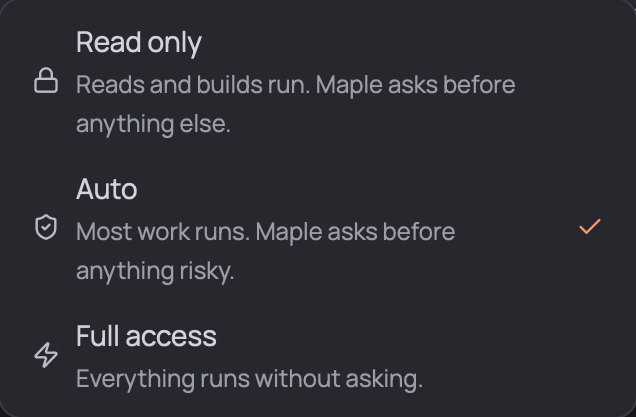
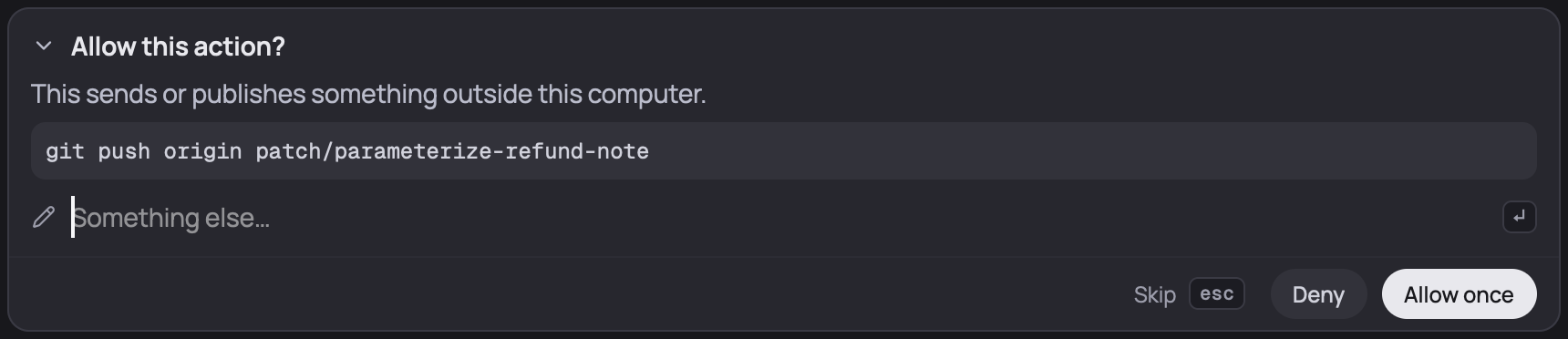
Every task has a mode. In Auto, Maple asks before anything risky.
Auto is a judgment call, not a guarantee.
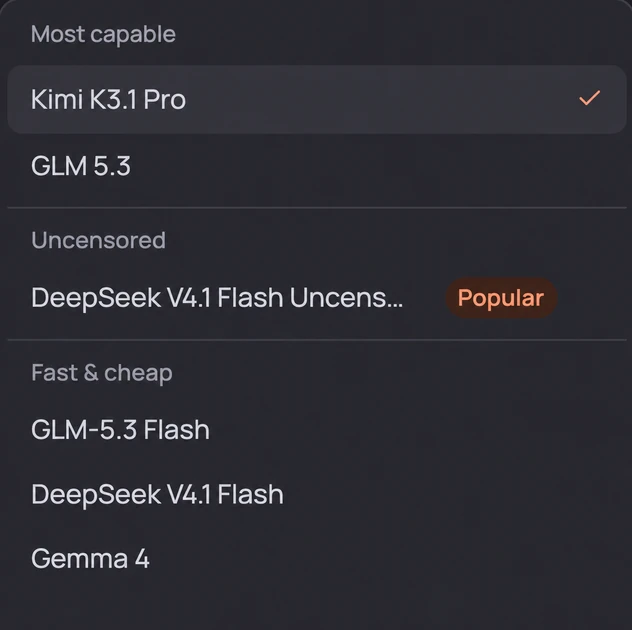
Start with the task, then the lowest-cost model that works.
It works with the apps you already use.
Ask in a sentence.
- “Turn the porch lights on at 9 with Home Assistant.”
- “Summarize this week’s Linear issues in Notion.”
- “File this month’s receipts from Dropbox.”
- Notion
- Stripe
- Dropbox
- Linear
- Jira
- Vercel
- Cloudflare
- Home Assistant
- Airtable
- Todoist
- Evernote
- Miro
- ClickUp
- PayPal
- Square
- Intercom
- Wix
- WordPress.com
- GitLab
- Supabase
- Sentry
- Xcode
- Playwright
Also in Zed, JetBrains IDEs and Paseo over ACP, plus a Local API.
All your computers, one sidebar.
Run each task on the computer that has what it needs.
- Work where the files are.
- Pick the right computer.
- Long jobs run on a Mac that stays on.
Pair once with a one-time code, like K7QM-R2TX.
Maple cannot see your chats.
Private by design, and you can check it. The models run inside secure enclaves: sealed hardware that even Maple can’t look into.
-
Yours
Your computer
Where the agent runs. Your projects and task history stay here.
Help me make sense of my last three checkups.Here are your three checkups, side by side. -
You check this
Maple’s enclave
Sealed, and running open-source code. You can check it yourself.
-
Maple checks this
The model’s enclave
Maple’s enclave checks it before any prompt is sent.
You check Maple’s enclave, and Maple’s enclave checks the model’s.
Hand-offs, web search and connected apps are outside that promise. Each one has its own switch.
Three ways to run AI on your own files
Private AI without a rack of GPUs.
Maple Work
- Where the AI runs
- A secure enclave
- Who can read your chats
- No one at Maple
- Can you check it?
- Yes
- Hardware you need
- No special hardware
A regular AI service: the company can read your chats, and you can’t check.
Your own computer: private, but it needs 350 GB to 1.4 TB of memory.
| Question | Regular AI service | Your own computer | Maple Work |
|---|---|---|---|
| Where the AI runs | Their servers | Your computer | A secure enclave |
| Who can read your chats | The company | Only you | No one at Maple |
| Can you check it? | No | Yes | Yes |
| Hardware you need | Any computer | 350 GB to 1.4 TB of memory | No special hardware |
Audit the code you can’t send anywhere else.
Elsewhere, getting the refusal lifted can mean letting them keep the code. On Maple it doesn’t.
Questions, answered plainly.
What is Maple Work?
Maple Work is a private AI agent for your desktop. You point it at a project folder and describe a task the way you’d tell a colleague. It lays out a plan, reads files, runs commands and finishes the job, on open models that run inside secure enclaves. You can steer it mid-task, queue the next ask, and attach files and images. If something is unclear, it asks you.
What is a private AI agent?
A private AI agent does multi-step work for you without the company behind it being able to read what you send. Maple Work does this by running its models in secure enclaves that you can check, not by promising it in a policy.
Can Maple see my files or chats?
Maple cannot see your chats. The agent runs on your computer, and your projects and task history stay there. What it reads from your folder is sent to the model as part of the chat, inside a secure enclave: sealed hardware that even Maple can’t look into. You check Maple’s enclave, which runs open-source code, and Maple’s enclave checks the model’s before any prompt is sent. Hand-offs, web search and connected apps are outside that promise. Each one has its own switch. See how the check works.
Does it ask before doing something risky?
You pick a mode for each task: Read only, Auto or Full access. In Auto, most work just runs, and Maple asks before anything risky, like pushing code or sending something outside your computer. Auto is a judgment call made by a Maple model, not a guarantee. Full access runs everything without asking.
Can I use it for security work?
Yes, for defensive work on code you own or are engaged to test: data-flow audits, incident timelines from logs, patch-day exposure checks and disclosure drafts. The models run in secure enclaves, so Maple cannot see your chats. See Maple for security work for the models and details.
How is it different from running AI locally?
Running the model yourself is fully yours, but today’s top open models need 350 GB to 1.4 TB of memory. Maple Work runs those same kinds of models for you in secure enclaves, so you get them on the computer you already have, with no GPUs to buy.
How is it different from a no-training promise?
A promise is a policy, and a policy is a setting someone else controls. Maple Work is built so Maple can’t read your chats in the first place, and you can run the check yourself.
Which computers does it run on?
Mac with Apple silicon, Windows (x64 and ARM64) and Linux (x86_64).
Which models can I use?
DeepSeek V4.1 Flash is the default. You can also pick Inkling 2 Small, Kimi K3.1 Pro, GLM-5.3 Flash, GLM 5.3, DeepSeek V4.1 Flash Uncensored and Gemma 4 31B, and switch between messages; the task carries over. The pairings on this page are places to start, not rules: begin with the task, then pick the lowest-cost model and thinking level whose answers you’d accept. Open models run a few months behind the very best, and for everyday work most people can’t tell the difference. Which model for which task.
Which apps can it connect to?
The built-in catalog has 26 apps: Notion, Todoist, Dropbox, Airtable, Evernote, Miro, Zapier, Jira and Confluence, Linear, monday.com, ClickUp, Stripe, PayPal, Square, Intercom, Wix, WordPress.com, GitLab, Vercel, Cloudflare, Supabase, Sentry, Vana, Home Assistant, Playwright and Xcode. Most connect with one browser sign-in. You can also add any MCP server of your own.
Does it use my AGENTS.md, skills and MCP servers?
Yes. It reads the AGENTS.md or CLAUDE.md you already have, uses your skills as slash commands and connects to any MCP server. You can also use Maple Work from Zed, JetBrains IDEs and Paseo over ACP; tasks started that way run in Full access, and computer use and hand-offs only work in the app. A Local API lets other apps on your computer call Maple’s models at an OpenAI-compatible address on 127.0.0.1.
Can I use Claude Code or Codex?
Yes. If you have them installed, you can hand a task to Claude Code or Codex on your own Claude or OpenAI account. That hand-off is not private, and Maple Work labels it as an external agent. Some people choose it when they want a frontier model for work that will be public anyway, like a blog post, a landing page or open-source code.
Can it run on my other computers?
Yes. Install Maple Work on each computer and pair them once with a one-time code. Every computer’s projects then show up in one sidebar, and you can start, watch and steer a task on any of them from the one you’re at. The task runs on the computer you pick, so your projects stay on your own computers and nothing is uploaded or synced. The agent itself runs on your computers, and the link between them is end to end; Maple’s relays only route the connection. It pairs computers, not phones.
Which plan do I need?
Maple Work is included with Pro, Max and Team. Pro is $20/mo, Max is $100/mo and Team is $30/user/mo. It isn’t available on the Free plan. See plans.
Is Maple Work open source?
Yes. The app is open source under the MIT license, so you can read the code before you run it.
Download Maple Work.
- Mac with Apple siliconM1 or later Your computer Download Mac with Apple silicon
- Windows x64Intel or AMD (x86_64) Your computer Download Windows x64
- Windows ARM64Windows 11 on ARM Your computer Download Windows ARM64
- Linuxx86_64 Your computer Download Linux
Included with Pro, Max and Team. See plans
Hand it the folder you’ve been putting off.
Maple Work is included with Pro, Max and Team.