Venice AI's privacy depends on the mode: only its Pro E2EE mode keeps your prompt from Venice's own servers.1
Maple decrypts every chat, on every plan, only inside attested enclaves, and our apps check the enclave automatically before each session. The tradeoff is a smaller set of open-weight models.
Venice offers about 140 text models, including Claude, GPT, Gemini and Grok, across four privacy modes.2 Choose based on the models you need and how much of your privacy you want to rest on a promise.
What to compare before choosing
"Private" describes different arrangements on these two services. Start with the question that decides the rest: in the mode you will use, who can read the prompt while it is processed? Then ask whether you can check that answer or have to take the company's word for it.
After that come the practical questions: models, features, price, platforms and payment. Our roundup of private AI chat apps applies the same tests to more services.
Compare equivalent plans. Venice's enclave modes require Pro, so Maple Free lines up with Venice Free, and Maple Pro with Venice Pro.1
Maple and Venice side by side
Maple's figures come from our pricing page, team plan page, downloads page, proof page and about page. Venice's figures come from its own pages, cited in each row.
| Maple | Venice | |
|---|---|---|
| Free plan | 100 messages a day; GPT-OSS 120B and Llama 3.3 70B; web search | 10 text and 15 image prompts a day; base models, uncensored included; web search; no TEE or E2EE3 |
| Main plan | Pro $20/month | Pro $18/month or $180/year3 |
| Higher tiers | Max $100/month | Pro Plus $68/month ($735/year); Max $200/month ($2,160/year)3 |
| Yearly billing | Bitcoin only: Pro $216, Max $1,080 (10% off) | By card, e.g., Pro $1803 |
| Team plan | $30 per user/month, pooled credits | None found |
| Models | 8 chat models plus 1 API-only, all open-weight, all in attested enclaves | About 140 text models; the same 12 run in TEE and E2EE on Pro2 |
| Frontier models | None in Maple Chat | Claude, GPT and Gemini (Anonymous); Grok (Private)2 |
| Where prompts are readable | Inside Maple's attested enclave and the model's attested enclave; Kagi receives model-written search queries | Depends on the mode (see the next table)1 |
| Verification | App checks Maple's enclave each session; Maple's enclave checks the model's | Web app checks the model's enclave for E2EE sessions; a verification icon on each E2EE response opens the attestation report1 |
| Chat history | Stored encrypted, syncs across devices | Stays on each device; encrypted backup on Pro4 |
| Memory | None yet | Memoria, stored in the browser; off in E2EE5 |
| Web search | Every plan, via Kagi, called from Maple's enclave | Brave and an anonymized Google path; off in E2EE4 |
| Documents | Parsed on your device in the desktop and mobile apps, Pro and above | Not on Free3; not in E2EE6 |
| Image, video, music generation | None | Yes3 |
| Platforms | Web, iOS, Android, macOS, Windows, Linux | Web, iOS, Android; no desktop app found7 |
| Payment | Card, Apple, Bitcoin (yearly Pro and Max; not Team) | Card, Apple, credits in USD or USDC, Bitcoin through BTCPay on yearly plans4 |
| Open source | Apps, enclave service and API proxy under MIT; billing server private | No public app source found8 |
| Training on chats | Not used to train models | Terms §10.2 bar training on user content9 |
| Compliance | Working toward a SOC 2 audit; no BAA | No SOC 2, HIPAA or BAA claim found |
| Company | Maple Privacy Labs Inc., Austin, Texas | Venice.ai, Sheridan, Wyoming9; founder and CEO Erik Voorhees10 |
Checked 31 Oct 2026.
Some things are the same on both. Each says chats aren't used to train models, offers an OpenAI-compatible API, has web, iOS and Android apps, and accepts Bitcoin on yearly plans.
Is Venice AI private? Its four privacy modes
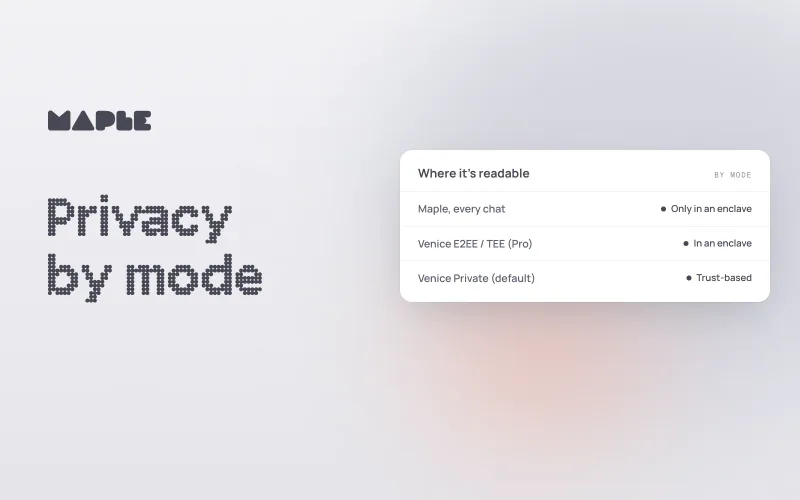
Venice AI keeps your prompt from its own servers only in E2EE mode, on Pro; Venice describes its other modes as protected by policy and contracts. Every Venice request passes through Venice's own proxy, and the protection after that depends on the model's mode.1 Private is the default. TEE and E2EE are available only on Pro, and only for the same 12 open-weight models, including GLM 5.3, Kimi K3, GPT OSS 120B and Gemma 4 26B Uncensored.
| Mode | Models | Where the prompt is processed | Venice's own words |
|---|---|---|---|
| Anonymous | Claude, GPT, Gemini and other third-party models2 | Venice's proxy, then the third-party provider | "Prompt content is still visible to that provider."11 |
| Private (default) | Models such as Grok and Venice Uncensored2 | Venice's proxy, then Venice-controlled GPUs or zero-data-retention partners | "Trust-based — relies on Venice and partners honoring contracts"1 |
| TEE (Pro only) | The 12 enclave models | Venice's proxy over TLS, then an enclave run by NEAR AI Cloud or Phala Network | "Neither the partner nor Venice can access your prompts during processing"; "you are still trusting Venice that data in transit is not being retained" |
| E2EE (Pro only) | The same 12 | Encrypted in your browser, decrypted in the enclave | "no one (including Venice) can see your data" |
E2EE is the one mode where Venice's servers relay a prompt they can't read. Venice turns off web search, memory and file uploads there, along with its own system prompt.1, 6 In TEE mode, the enclave protects processing, but the prompt reaches Venice's proxy over ordinary TLS first.
Policy versus design
Outside E2EE, Venice's protection of the prompt is a promise. Venice says so plainly in the post that launched its encrypted modes:
In Anonymous and Private modes, privacy is enforced by policy and contractual commitment (you are trusting Venice to do what we promise).
The same post says of TEE that "you are still trusting Venice that the data in transit is not being retained (it's not)."12 Its privacy page says requests are "relayed without being stored."1 Venice may honor every one of these statements. The point is that nothing in the product lets you check them.
Memory and web search follow the same pattern.
Memoria stores memories in your browser, and Venice says its servers "only generate embeddings transiently. They do not store your memories."5 For search, Venice's FAQ describes Brave as zero-data-retention and its Google path as anonymized.4 Both are policies, and both are off in E2EE.
Maple works the other way. We decrypt prompts and history only inside an attested enclave, your app checks that enclave, and the code is public. You don't have to take our word for it.
| Setting | What protects the prompt | How you can check |
|---|---|---|
| Venice Anonymous | Venice hides your identity; the provider sees the prompt1 | No attestation |
| Venice Private | Contracts between Venice and its partners | No attestation |
| Venice TEE (Pro) | A partner enclave, after Venice's proxy | Attestation for the enclave; the proxy step rests on policy |
| Venice E2EE (Pro) | Browser encryption to the attested enclave | Web app checks the enclave for E2EE sessions; a verification icon on each response |
| Maple (every plan) | Device encryption to Maple's attested enclave, which verifies the model's enclave | App verifies Maple's enclave each session; public code |
Maple still asks you to trust some things:
- The hardware behind each enclave, Maple's and the model's.
- The published code that runs in Maple's enclave.
- Maple's signing key, which signs the list of approved enclave builds.
- Kagi, which receives the search queries the model writes when web search runs.
Venice's E2EE mode asks for a comparable kind of trust: Intel and NVIDIA enclave hardware, its partners' enclave software, and Venice's web app, which performs the check and is not published as source.1, 8
How Maple works
Maple is a private AI chat service that gives you capable open-weight models without running the hardware yourself. Maple Chat offers eight models, including GLM 5.3, Kimi K3, DeepSeek V4.1 Flash, Gemma 4 31B, GPT-OSS 120B and Llama 3.3 70B, and the API adds GPT-OSS Safeguard 120B. Our model library describes each one.
Free includes GPT-OSS 120B and Llama 3.3 70B at 100 messages a day. Pro, Max and Team add the rest, including an uncensored DeepSeek V4.1 Flash in beta. Every model, on every plan, runs on the same private path.
The model check works like certificate chains on the web: you check Maple's enclave, and Maple's enclave checks the model's before it forwards anything. If your app's check of Maple's enclave fails, the session stops before any chat is sent.
Your chat history is stored encrypted on our servers, with a key used only inside the enclave, so it syncs across your phone, laptop and browser. We don't offer cross-chat memory yet.
Maple includes web search on every plan. It runs through Kagi's search API, called from inside Maple's enclave, and Kagi receives the search query the model writes, not your account. Kagi's privacy policy says it does not store API queries against an account or use them to build a profile.13
Maple Work is our desktop agent for Mac, Windows and Linux, in early access on paid plans. It runs on your machine and sends model calls to Maple's enclave. It can also hand a task to Claude Code or Codex signed in to your own account, and that hand-off is not private.
For developers, Maple Proxy provides an OpenAI-compatible endpoint that runs locally or in Docker. It verifies the enclave automatically and encrypts each request. No one at Maple can read your API prompts or responses. We keep usage records so we can bill you.
You can sign up with email or, on paid access, with an Account ID and password instead. Our guide to using AI privately explains that option and its tradeoffs.
What each app verifies
Both services run an automatic check in their web apps; the difference is when it runs. Maple's apps verify Maple's enclave at the start of every session, on every plan. They check a fresh nonce, the signature and certificate chain back to Amazon's Nitro root, and that the enclave's code measurement matches an approved build on a signed list.
You can run the same check in your browser with our enclave verification tool. That tool is served by Maple, so the stronger test is rebuilding the enclave image with Nix and comparing the measurements, as the proof page describes.
Venice's web app checks the model's enclave for E2EE sessions, and a verification icon on each E2EE response opens the attestation report.1 That is a direct check of the model's enclave, which Maple users don't get. In TEE mode, the attestation covers the enclave, not the proxy step before it.
For API use, Venice returns attestation evidence and leaves verification to the caller. Its guide says: "Don't just trust the verified: true response. Parse the Intel TDX quote client-side and verify the measurements match expected values."6 Maple Proxy runs that check for you.
Where Maple is ahead and where Venice is ahead
Both lists use the same standard: a checkable difference, stated plainly.
Where Maple is ahead
- Default coverage: every chat on every plan, Free included, is decrypted only inside attested enclaves. On Venice, only E2EE on Pro keeps prompts from Venice's servers.
- Verification everywhere: our apps verify the enclave before every session, and Maple Proxy does it for API calls. Venice's web app checks for E2EE sessions, and its API leaves the check to you.
- Open source: our apps, enclave service and API proxy are public under MIT, with a reproducible enclave build. Venice's apps are not public.
- Search with every model: web search works on every plan and model, called from inside the enclave, though Kagi receives the query. Venice turns search off in E2EE.
- Documents: our desktop and mobile apps parse documents on your device and send only the text. Venice doesn't support file uploads in E2EE.
- History: Maple Chat history syncs across devices, encrypted. Venice history stays on each device unless you restore a Pro backup.
- Desktop apps and teams: native apps for macOS, Windows and Linux, and a team plan at $30 per user per month. We found neither for Venice.
- Free allowance: 100 messages a day on Maple Free, against 10 text prompts on Venice Free.
Where Venice is ahead
- Model range: about 140 text models, including Claude, GPT, Gemini and Grok, against Maple's nine (eight in chat, one API-only).2
- Media: images, video and music, with 15 free image prompts a day. Maple has no generation.
- Price: Pro is $18 a month or $180 a year by card; Maple Pro is $20, yearly by Bitcoin only.3
- Direct verification: in E2EE, Venice's web app checks the model's own enclave.
- Memory: Memoria, stored in the browser. Maple has no memory feature yet.
- Uncensored models: more of them, including on Free and in E2EE. Maple's one is paid only.
- Range of plans: Pro Plus at $68 and Max at $200 a month, with credit banking, and credits payable in USD or USDC.
Who each option suits
If the models or media you need exist only on Venice, use Venice and choose the mode deliberately for each chat. If open-weight models cover your work, Maple gives you the enclave path without having to remember to switch it on.
Choose Maple if
- You want every chat on the enclave path without picking a mode, Free included.
- You want to check the privacy claim: an app that verifies each session, and code you can read.
- You want web search and document upload to work with every model, and accept that Kagi sees search queries.
- You work across a desktop, phone and browser and want encrypted history to follow you.
- You need a team plan or an API that verifies the enclave for you.
Choose Venice if
- You want Claude, GPT, Gemini or Grok in the same app as open models, and accept that they run in Anonymous or Private mode.
- You generate images, video or music.
- You want cross-chat memory, the lower Pro price or more uncensored models.
- You will use E2EE for sensitive chats and can give up search, memory and file uploads there.
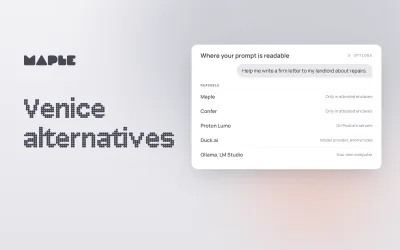
If neither fits, our guide to Venice AI alternatives covers other options.
Sources
- Venice, Privacy at Venice. The four modes, the shared proxy, Pro-only TEE and E2EE, TEE partners, E2EE limits and the verification icon.
- Venice, Public text model list (API). 141 text models (73 private, 68 anonymized); frontier models and their modes; the 12 E2EE models; uncensored models.
- Venice, Pricing. Plan prices, Free limits, credits, documents and media generation.
- Venice, Frequently asked questions. Payment methods, history, backups and search providers.
- Venice, Memoria: a technical overview, January 23, 2026. Browser storage and server-side embeddings.
- Venice, TEE and E2EE models guide. E2EE limits, API attestation evidence and client-side verification guidance.
- Venice, Download Venice. iOS and Android apps.
- Venice, Venice on GitHub. Public repositories; no app source found.
- Venice, Terms of Service, June 8, 2026. Section 10.2 on training and the company address.
- Venice, Welcome to Venice, July 18, 2024. Erik Voorhees as founder and CEO.
- Venice, Privacy overview (documentation). Provider visibility in Anonymous mode.
- Venice, Venice launches end-to-end encrypted AI, March 18, 2026. Policy and contracts in Anonymous and Private modes; trust in Venice's proxy in TEE mode.
- Kagi, Privacy Policy, September 22, 2026. Kagi's statement on API query storage.